Opening your secure portal
Checking your customer session…
TRADING INTELLIGENCE · EDUCATION · TECHNOLOGY
CUSTOMER WEB ACCESS
Connect your execution account without sharing your password.
FregFX verifies your identity through the Telegram account already registered to your customer profile. Your Exness password is never requested.
NEW CUSTOMER
Start your FregFX registration
You need a supported Exness API trading account and an approved FregFX customer profile before connecting live execution.
After approvalReturn here and enter the same trading account number. Your Telegram login code will then be sent automatically.
EXECUTION CONNECTION
Welcome, Customer
Complete the guided connection once. FregFX will verify the account before enabling execution.
NOT CONNECTED
- 1IdentityCustomer verified
- 2Public keyGenerate securely
- 3ExnessRegister Full Access
- 4VerifiedConnection checked
GUIDED SETUP
Generate your FregFX public key
How to connect ExnessProfessional six-step API connection tutorialOPEN GUIDE
EXNESS API TUTORIAL
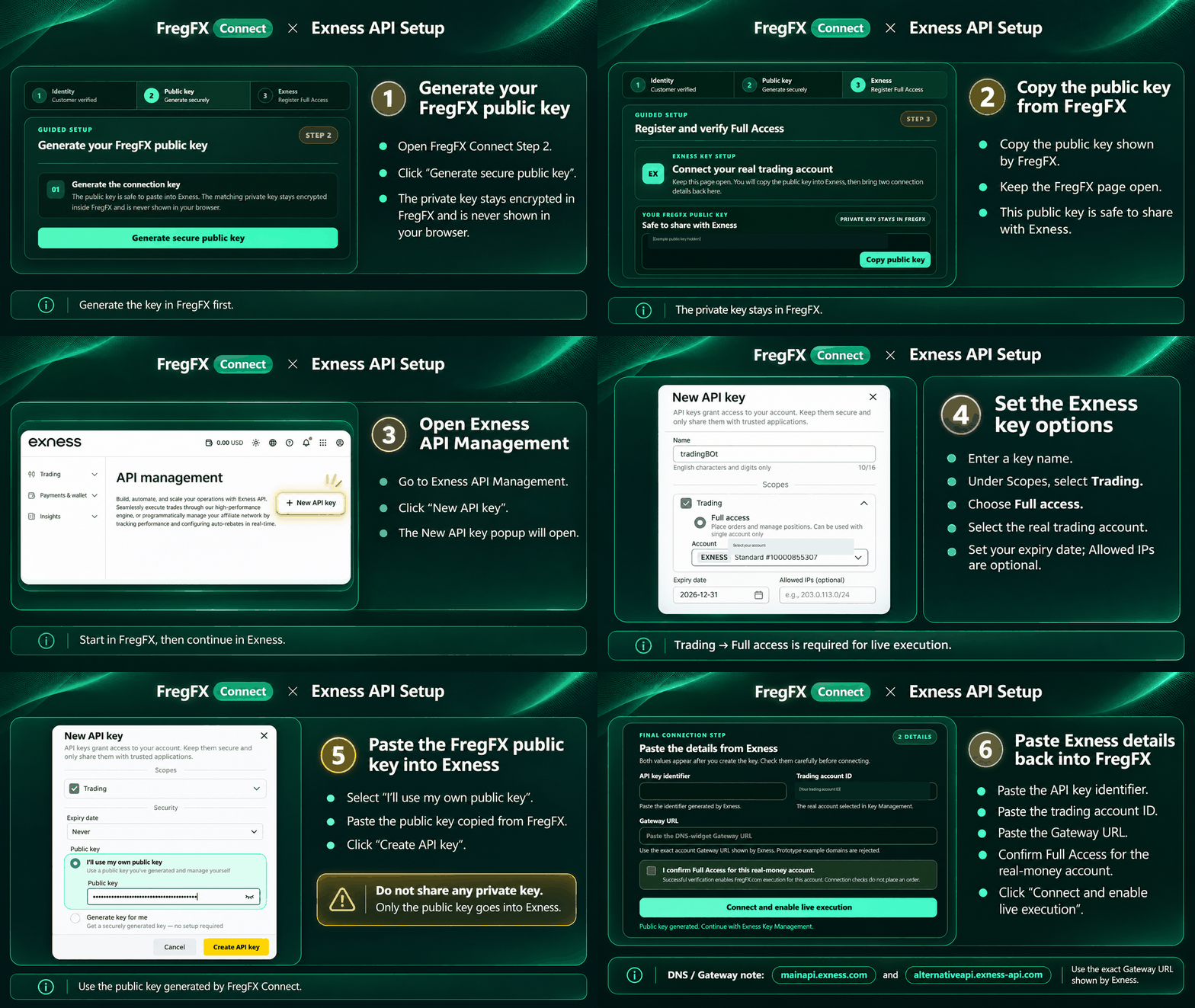
Connect safely in six steps
These examples contain no credentials. Use only the public key generated in your secure FregFX form.
STEP 1 OF 6
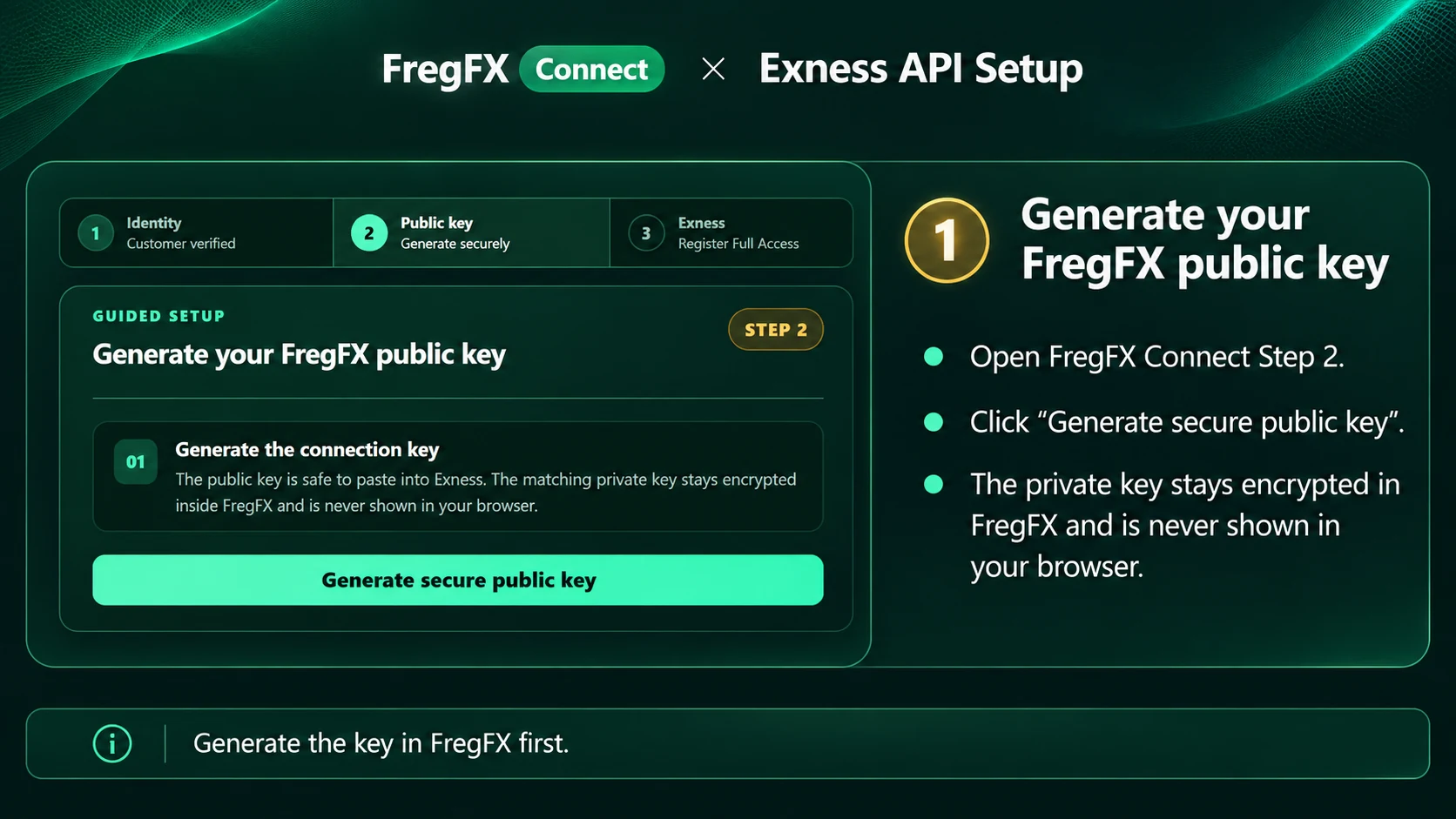
Generate your FregFX public key
Verify your identity, then generate the secure public key in FregFX. Your private key remains encrypted and is never shown in the browser.
Live activation
Completing Full Access verification binds the account and enables live API execution immediately. No order is placed during setup.
01
Generate the connection key
The public key is safe to paste into Exness. The matching private key stays encrypted inside FregFX and is never shown in your browser.
EXNESS KEY SETUP
Connect your real trading account
Keep this page open. You will copy the public key into Exness, then bring two connection details back here.
YOUR FREGFX PUBLIC KEYSafe to share with Exness
PRIVATE KEY STAYS IN FREGFX- 1Open Exness API Management
Sign in to the account owner’s Personal Area. Exness will open the page where API keys are created and managed.
Open API Management - 2Create a key in Key Management
Open Key Management, choose to create a new API key, and paste the FregFX public key shown above.
Use the key copied from this page - 3Choose Full Access and your real account
Select Full Access, then select the exact real-money trading account registered with FregFX.
Required: Full Access · Real account - 4Return with your API key identifier
Copy the API key identifier shown by Exness. FregFX already knows the official Exness DNS hostnames, so you do not need to copy a Gateway URL.
✓
No order is placed during setup. FregFX first verifies the account and permissions using signed read checks through the official Exness DNS route.
✓
CONNECTION LIVE
Your Exness API connection is ready
Your Full Access key passed signed account checks, is bound to the account below and is enabled for live API execution.
- Account
- —
- Access
- Full Access
- Live orders
- Disabled
- Instruments
- —
MY TRADING DASHBOARD
Execution control center
Monitor and manage only your verified trading account.
REAL-TIME MONITORConnecting…
ROBOT EXECUTION ROUTEFregFX → Exness APIAccount —
LIVEAPI CONNECTIONFull AccessSigned Exness account
EXECUTIONEnabledReal API orders
AUTOMATIONManualApproval required
ACCOUNT ACTIVITY0 positionsP/L unavailable
LIVE BROKER POSITIONS
My open trades
Loading your broker positions…
No open tradesYour broker account currently has no open positions.
| Market | Side | Volume | Entry | Current | Risk progress | SL | TP | P/L | Source |
|---|
EXNESS API CONNECTION
VERIFIED & LIVEConnection management
- Customer
- —
- Trading account
- —
- Permission
- Full Access
- Available instruments
- —
Your signing key remains encrypted on the server. FregFX never needs your Exness password, email password or verification code.
We could not open the portal
Please try again.